STEM Protect i Coming Soon
Duress and security monitoring for the next evolution of responder safety.
An additional safety layer when a responder cannot call for help—and more incident information when duress is raised. STEM Protect combines local safety analysis with response through STEMConnect and CAD.
Designed for Ambulance, Paramedics and Fire and Rescue.

When pressing a button is not possible.
Manual duress is essential. But an injury, assault or rapidly changing incident can prevent a responder from reaching it. STEM Protect adds local safety indicators and agency-configured verification alongside deliberate activation.
Support when manual activation is difficult.
Potential safety indicators follow agency-approved verification and escalation.
Additional safety support when a responder cannot call for help.
Unable to reach the device
Injury or restraint can prevent a responder from activating manual duress.
Sudden impact or inactivity
Movement changes can indicate a situation that warrants a responder check.
Separated from the handset
Separation can limit access to manual controls.
Device observations must be interpreted in context.
Rapid escalation
An incident can develop faster than a responder can request assistance.
Designed to complement radios, manual duress and established operational procedures.

How STEM Protect works for Duress and security monitoring
Analyse locally. Verify where appropriate. Share authorised incident context when assistance is needed.
Routine analysis stays on the device, without continuous audio or physiological streaming to control.
OBSERVE
Qualified audio and kinetic data are processed immediately on the individual handset locally.
ON-DEVICE ANALYSIS
CONFIRM
Detected anomalies can trigger an automated safety validation protocol before any dispatch. Immediate manual alarms bypass this and alert the control center instantly without delay.
Sample verification process
RESPOND
Emergency signals are prioritized via STEMConnect to CAD. Authorized monitoring tools provide vital situational data for active units.
VALIDATE PRIOR TO TEAM ALERT
LOCAL ANALYSIS. CONTROLLED ESCALATION.
Operational Mode Capabilities
- Standard processing prioritized for privacy
- On-device EVALUATION of risky patterns
- Discrete input status monitoring
- High-frequency local context analysis
- Manual duress priority bypass
Protect Feature Set
- Higher frequency location
- Movement and impact events
- Significant acoustic event notifications
- Assigned Crew aware protection where authorised
- Approved safety event summaries informed by local wearable analysis
- Device and sensor status
- CAD and operator acknowledgement
- Optional protected incident audio where separately approved
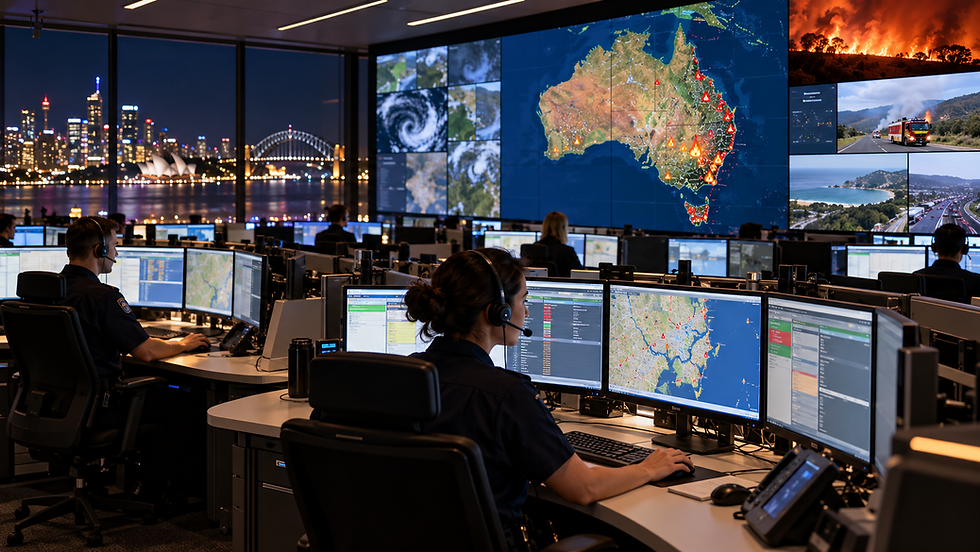
Three ways STEM Protect supports your agency
Support the responder, improve incident awareness and coordinate across the incident.
Support when manual duress is difficult
Local safety indicators and agency-configured checks add another way to identify situations requiring assistance. Voice activation provides a deliberate option where supported.
More context after an alert
Eligible location, movement and acoustic-event summaries can help authorised personnel assess the incident and coordinate assistance.
Protection across the incident
Authorised personnel can activate time-limited enhanced sensing on other designated responders’ devices assigned to the same incident.
External alert delivery requires connectivity. Enhancement of other devices does not automatically start recording or live listening.
Explore the capabilities
Activation and responder checks
Manual and voice activated duress triggers immediate alerts, while configured safety events may initiate a responder check before escalation. STEM Protect adds local safety indicators and agency-configured verification alongside deliberate activation. [Agency defined duress phrase] → DURESS ACTIVATED. Enables manual emergency activation through agency specified keywords.
+
Engineered for local, on-device keyword recognition — not continuous speech streaming or transcription.
Enhanced sensing and incident-wide protection
Local sound and movement analysis identify potential safety events. Following duress, the device can increase eligible movement and acoustic analysis to provide additional incident context. Authorised personnel can activate time-limited enhanced sensing on other designated responders’ devices assigned to the same incident. Targets are determined by incident assignments, not proximity.
+
Location, CAD delivery and connectivity
STEM Protect is designed to increase eligible location update frequency during an active safety incident as part of Duress and security monitoring. Emergency signals are prioritized via STEMConnect to CAD, while safety events continue to be processed locally during connectivity loss, with pending events reconciled when connectivity returns. External alert delivery still requires connectivity.
+
Approved body-worn monitoring
Integration with compatible, agency approved body worn monitoring devices is designed to contribute to local safety assessment. Physiological measurements remain local; numerical readings and trends are not streamed to control room.
+
Not intended as a continuous remote health-monitoring or diagnostic service.
Optional protected incident audio
Where separately authorised and enabled, explicit manual duress can preserve available pre event audio and record for a configured period afterwards. Pre event audio depends on an authorised local buffer already being active. Retained recordings are encrypted, with separate permissions for upload and evidence access.
+
Optional. Controlled. Incident-specific.

Safety support for paramedics
Additional safety support when the paramedic’s attention is on the patient—and clearer incident information when assistance is needed.
For the paramedic
A deliberate voice option
Use an agency-configured keyword or phrase to activate duress where supported.
Support when controls are out of reach
Local safety indicators can initiate an agency-configured responder check before permitted escalation.
Local safety analysis
Routine analysis stays on the device, including supported physiological information.
For the ambulance service
Defined escalation
Route alerts through the agency’s agreed response procedures.
More incident context
Use authorised location, movement and safety-event summaries to support coordination.
Support across the incident
Enhance sensing on other designated responders’ devices assigned to the same incident, subject to permissions and connectivity.
Operational Privacy
Routine analysis remains local. Recording requires separate authorisation, and enhancement of other devices does not automatically start recording or live listening.

Safety support for Fire & Rescue
Additional responder safety support in changing operational conditions, with incident-linked enhancement and compatible body-worn equipment.
For the firefighter
Another way to activate duress
Deliberate voice activation provides an additional option where devices and operational conditions support it.
Local safety indicators
Sound and movement observations can initiate an agency-configured responder check before permitted escalation.
Approved body-worn equipment
Compatible monitoring devices can contribute to local safety assessment. Numerical physiological readings remain local.
For the fire and rescue service
Defined response procedures
Apply agency-configured escalation alongside established incident command.
Enhanced incident awareness
Receive approved location, movement and acoustic-event summaries, subject to connectivity.
Works alongside established procedures
Complements radios, incident command, crew accountability and approved safety equipment.
Help explain what happened before and after duress.

An incident can unfold in seconds. Where separately authorised and enabled, STEM Protect can preserve available audio from before manual duress activation and record for a configured period afterwards—helping authorised reviewers understand the sequence of events.
Encrypted incident audio. Built for privacy. Controlled by your agency.
Before
Preserve available pre-event audio when an authorised local buffer is already active.
During
Explicit manual duress activation triggers the separately authorised incident recording.
After
Continue recording for the agency-configured period after activation. Retained incident audio is encrypted.
Optional and off by default. Pre-event audio requires an already active, authorised local buffer. Passive detection and enhancement of other responders’ devices do not themselves start recording or enable live listening.
Recording permissions and evidence controls
Buffering and recording require separate authorisation. Permission to capture does not automatically permit upload, playback or export. Evidence access and retention are governed separately by agency policy.
External delivery requires connectivity. Permitted local functions can continue while the app and required sensors remain available.
PRIVACY & CONTROL
Privacy by design. Agency control.
STEM Protect has been developed with local processing, defined permissions and accountable evidence handling. It is not yet released.
Local analysis
Routine sensing stays on the device. Numerical physiological readings and trends are not streamed to control.
Separate recording permission
Buffering and recording require separate authorisation. Capture does not automatically permit upload or playback.
Incident-linked enhancement
Enhancement targets designated responders linked to the incident and is time-limited and permission-controlled.
Controlled evidence access
Separate permissions govern viewing, export and retention, supported by audit records.
Your agency defines the boundaries
Configure operating profiles, responder checks, enhancement permissions and evidence handling for the agency’s approved operational purpose.

Discuss STEM Protect for your agency
Talk with SDSI about your responder safety priorities, devices and operational workflows.
Supported Hardware & Infrastructure
Evaluate compatible mobile handsets, designated wearables, and CAD ecosystem integration. Operational deployment remains subject to validation, supported device and interface compatibility, connectivity, agency configuration and approval.
Privacy and governance
Define enhancement permissions, optional recording and evidence handling.